Blog

Ignition MES Integration With the twinzo Digital Twin

How Ignition collects shopfloor data, which industries run it, and how twinzo turns those tags into a live digital twin.

  • Patrik Pasko

  • August 27, 2026

twinzo logistics analytics on a phone
Ignition MES Integration With the twinzo Digital Twin

What Ignition Is in a Plant Stack

Ignition is Inductive Automation's industrial application platform. Plants use it as SCADA, HMI, IIoT hub, and MES foundation on one server-centric Gateway instead of bolting separate products together for every screen. You connect PLCs and drivers, model tags, build Perspective or Vision clients, store history, alarm, report, and extend the same system with modules for MQTT, SQL Bridge, sequential function charts, and MES suites such as Sepasoft.

That architecture is why Ignition shows up in so many digital-twin conversations. The plant already has live machine state, counts, OEE pieces, and process values in one tag namespace. The missing piece is often spatial: those tags still live in dashboards and reports while supervisors walk the hall to match a soft KPI to a bay. twinzo sits on top of that Ignition reality. It does not replace Gateway. It maps the tags you already trust onto the facility model so MES data appears where the work happens. That spatial layer is what twinzo features add on top of SCADA and MES, and it pairs with other plant feeds the same way as OPC UA and location data from HighByte.
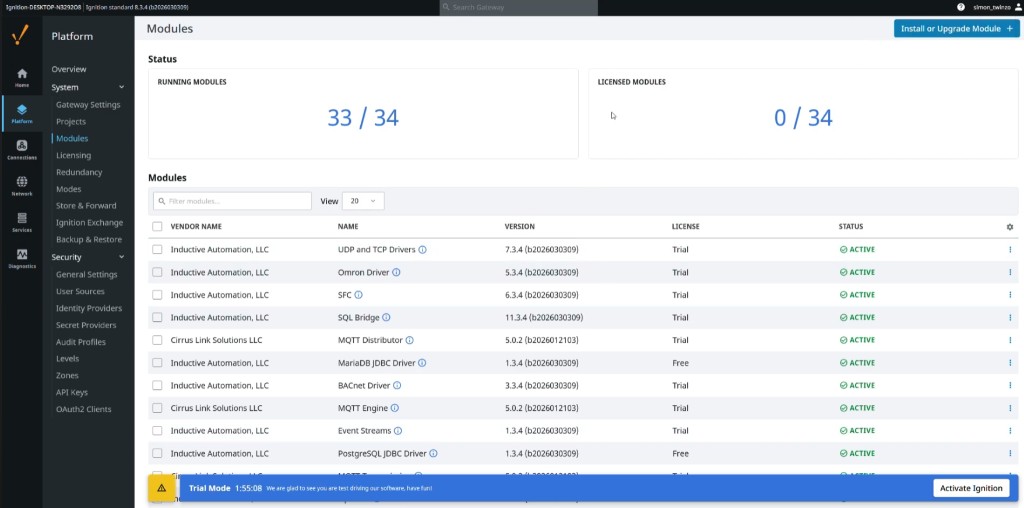
Ignition Gateway Modules page with MQTT, SQL Bridge, and drivers active

Who Runs Ignition Today

Inductive Automation reports Ignition installations across more than 140 countries, a large integrator network, and use by a majority of Fortune 100 companies. Public case studies and customer lists span food and beverage, oil and gas, water and wastewater, automotive, chemicals, life sciences, packaging, power, and discrete manufacturing. Named examples that Inductive publishes include Sierra Nevada Brewing Co. running facility-wide SCADA and MES-style work on Ignition, AriZona Beverages connecting plant SCADA and MES toward SAP, Enerchem on process fractionation, and municipal utilities such as St. Lucie West Services District on full Ignition SCADA.

The practical takeaway for twin projects is simple. If your OT team already standardized on Ignition for HMI and MES, you do not need a second shopfloor data platform to feed a digital twin. You need a clean path from Gateway tags to positions on the hall. That is the job of the twinzo Ignition plugin: keep Ignition as the source of truth, place selected tags on the twin, and let operations see OEE, downtime, throughput, and run state in 3D context.

How Ignition Works Under the Hood

Everything centers on the Ignition Gateway. Drivers and OPC connections bring in PLC and device data. Tags organize that data into folders and providers so Perspective screens, historians, alarms, and scripts all read the same values. Designer is where engineers build projects. Clients open web-deployed Perspective apps or Vision clients for operators. Modules add capability without changing that core: MQTT Distributor and Engine for IIoT payloads, SQL Bridge for database transactions, JDBC drivers for MariaDB or PostgreSQL, BACnet or vendor drivers for building and machine protocols, SFC for sequential logic, and Sepasoft MES modules when you need OEE, track and trace, or recipe work on the same platform.

MES on Ignition is usually not a black-box monolith. It is tag-driven production logic and modules sitting on the same Gateway that already runs SCADA. Cycle counts, run or stop booleans, scrap counters, and calculated OEE live as tags or derived values. That is why integration to twinzo is tag orchestration rather than a custom MES extract. If Ignition can show the value on a Perspective page, the twinzo plugin can drag that same tag into a sensor for the digital twin.

Why Plants Pair Ignition With a Digital Twin

Ignition is excellent at collecting, historizing, and presenting industrial data. What it is not designed to be is a full facility digital twin with hall layout, areas, material flow, and 3D operations in one shared plant picture. Production meetings still open OEE and downtime charts. Shift leads still ask which cell on the floor matches the soft line on the chart. Material and people systems often sit elsewhere. The twin answers the spatial question Ignition dashboards were never meant to own.

With twinzo connected, MES and shopfloor tags stay in Ignition. The twin becomes the live operational environment where those values sit on machines, buffers, and areas. You monitor OEE, downtime, throughput, and bottlenecks in place. You track related assets and material flow on the same model when those feeds exist. Insights stop being locked in reports because the next action points at a bay on the twin, not only a row in a Perspective table.

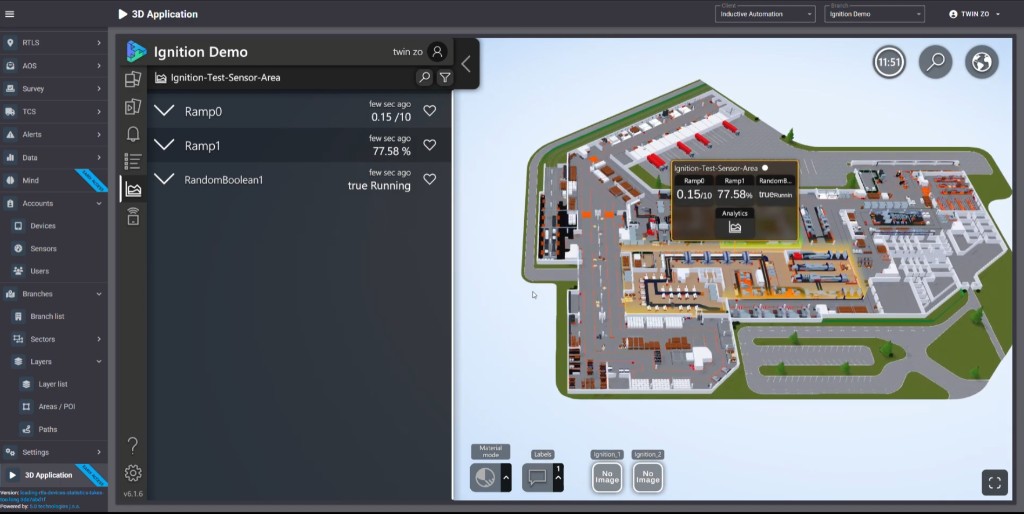
twinzo 3D digital twin with Ignition sensor area overlay and live MES tags

The twinzo Plugin Inside Ignition

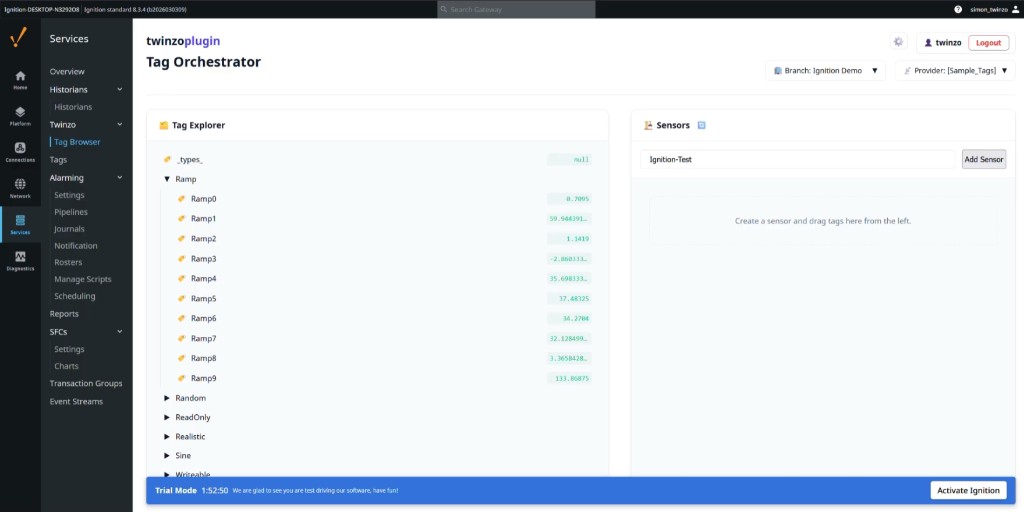
Integration runs through the twinzoplugin on the Gateway. Under Services you open Twinzo Tag Browser, also labeled Tag Orchestrator. Pick the twinzo branch that matches your facility project and the Ignition tag provider that holds production data. Create a sensor name that will represent a machine, cell, or zone on the twin. Then drag live tags from the explorer onto that sensor.

In the demo flow that path is obvious. Sample tags such as Ramp0 through Ramp9 and boolean run states update live in the explorer. You create a sensor like Ignition-Test, drag the tags you care about, and confirm values move before you leave Ignition. That is connect MES and shopfloor data instantly in the literal sense: no parallel historian for the pilot, no CSV drop, no second OPC client just to prove the twin. Gateway remains the hub. twinzo subscribes to the tags you mapped.

Ignition twinzoplugin Tag Orchestrator mapping Sample Tags to an Ignition-Test sensor

Place Sensors on the Facility Map

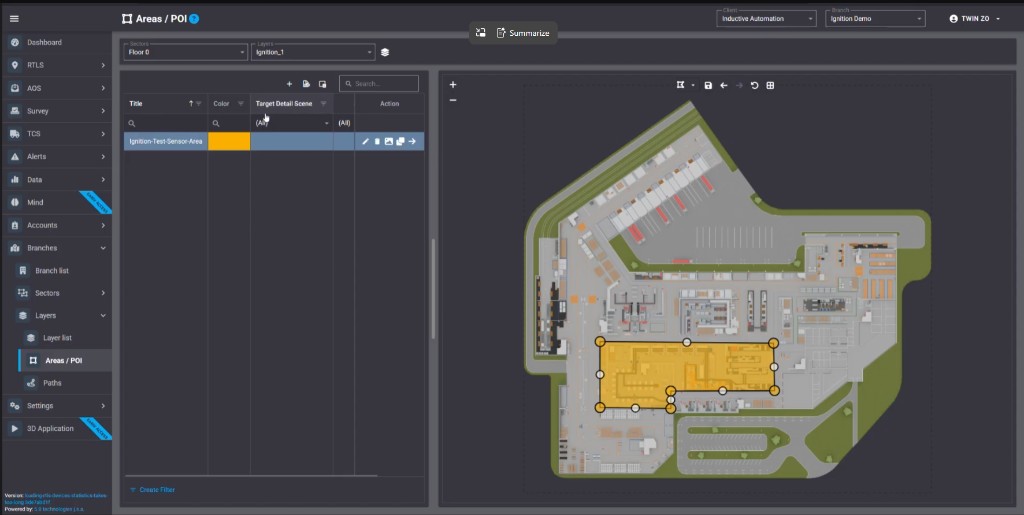
Tags alone are not a twin. In twinzo you open Areas / POI for the same client and branch, for example Inductive Automation / Ignition Demo, and draw a polygon on the floor plan where those Ignition tags belong. Name the area to match the sensor so operators see one label from Gateway to 3D. The map holds the physical address. Ignition keeps holding the values.

That step is what turns MES data into something you can walk. A throughput tag and a Running boolean are no longer only folder paths under Sample_Tags or a production provider. They belong to a yellow area on Floor 0 next to the real machines on your layout. Layers and sectors keep multi-hall plants organized the same way you already split Perspective projects by line or site.

twinzo Areas and POI with Ignition-Test-Sensor-Area drawn on the plant floor plan

Live MES Values in the 3D Application

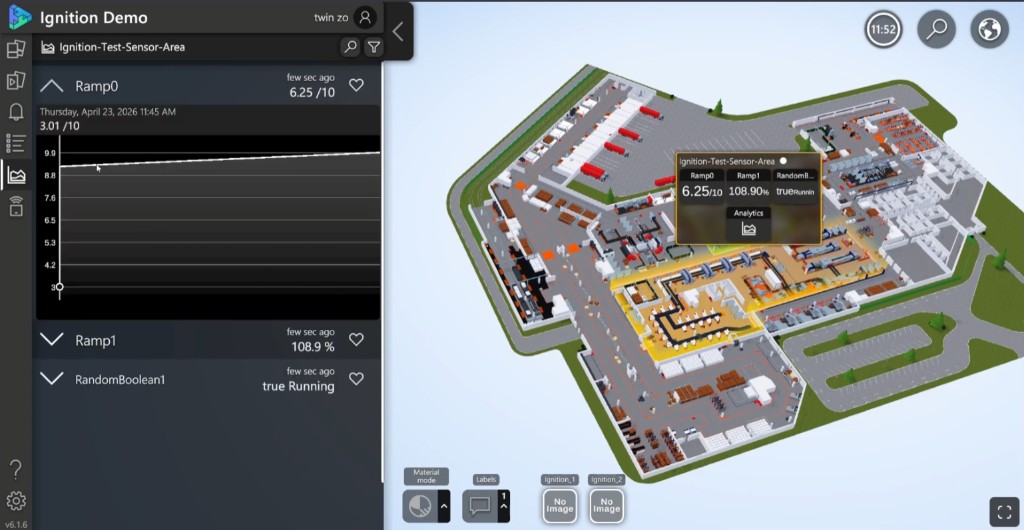
Open the twinzo 3D application on the same client and branch. The facility model shows docks, lines, and halls. Click the Ignition sensor area and the overlay lists the mapped tags with live values, for example ramp rates, percentages, and Running state updated seconds ago. The side panel mirrors the same feed so a supervisor can stay on one plant picture while still reading Ignition truth.

This is visualize production in real time without rebuilding MES screens. Operators keep Perspective at the machine for control. Plant and ops leadership use the twin when the question is where on the floor the KPI belongs, which neighboring cells still look healthy, and whether a bottleneck is the machine or the empty buffer beside it. From the same callout you can open Analytics for the tag trend without leaving the bay on the model.

twinzo 3D analytics drilldown for Ignition-Test-Sensor-Area with live Ramp trend

What You Monitor Once Tags Have a Place

Because Ignition already computes or collects the industrial metrics, the twin inherits them as soon as they are mapped:

• OEE and availability pieces - run versus stop, planned downtime, and related counters on the cell area.

• Downtime and micro-stops - boolean or state tags that light the bay when the line is quiet longer than expected.

• Throughput and bottlenecks - rate and count tags on neighboring areas so starvation and blocking show as places, not only plant averages.

• Process and quality feeds - any tag Ignition already exposes, from scrap to temperature to recipe step.

• Assets and material flow - combine MES tags with other twinzo feeds so machine state and movement share one model.

The connected workflow is Gateway modules and tags, twinzo Tag Orchestrator, Areas / POI placement, then live 3D and analytics. From MES data to an interactive digital twin without a second source of truth.

How to Wire the Integration End to End

1. Confirm Ignition is healthy - Gateway version, modules you rely on, and the tag providers that already feed production screens.

2. Install and open the twinzo plugin - Tag Orchestrator under Services, with branch and provider selected.

3. Create sensors and drag tags - one sensor per machine or area you want on the twin, with live values verified in Ignition.

4. Draw matching Areas / POI in twinzo - same names, correct floor and layer.

5. Validate in 3D - open the application, click the area, confirm tags update, then open Analytics on a known shift window.

Brownfield plants keep MQTT, SQL Bridge, historians, and Perspective exactly as OT left them. The plugin only publishes the subset of tags you choose. Start with one line. Expand when the first bay proves that Ignition values and twinzo positions stay in sync.

Industries Where This Pattern Fits

Anywhere Ignition already owns SCADA or MES, the same integration pattern applies:

• Food and beverage - brewery and bottling lines with OEE and CIP states on hall areas, as in published Ignition brewery and beverage cases.

• Discrete manufacturing and automotive - cell run state and throughput on the twin next to buffers and docks.

• Process and chemicals - unit operations and utility tags placed on process blocks of the facility model.

• Water and wastewater - pump and treatment states on plant maps that operators already navigate spatially.

• Pharma and life sciences - tightly governed Ignition tags surfaced in a controlled twin view for ops without cloning the MES.

If your company is already on Ignition for the reasons Inductive's customer base shows - unlimited licensing model, web deployment, modular SCADA plus MES - twinzo is the spatial layer for that investment, not a competing MES.

Connect Your Ignition Site to twinzo

If Ignition is already your SCADA or MES backbone, the shortest path to a live digital twin is mapping the tags you trust, placing them on your facility model, and watching production update in 3D. Keep Gateway as the system of record. Use twinzo for the plant picture those dashboards never had.

Get in touch if you want to walk through this on your own Ignition Gateway and facility model.

You might also be interested in:

How Photogrammetry Builds Plant 3D Models From Photos

How Photogrammetry Builds Plant 3D Models From Photos

When the CAD aisle no longer exists, overlapping photos still can. Here is how feature matching, bundle adjustment, dense stereo, and meshing turn hall, drone, and satellite captures into a scaled twin mesh.

Read more
Man Down Detection With Live RTLS Position

Man Down Detection With Live RTLS Position

A technician falls in a dangerous area. The phone beeps; if they do not cancel, security gets the incident and their live position on the twin - not a radio search across floors and stairs.

Read more

Landscape mode is not supported, please rotate your device.

By clicking “Accept”, you agree to the storing of cookies on your device to enhance site navigation, analyze site usage, and assist in our marketing efforts. View our Privacy Policy for more information.