Blog

Intuitive UX for Digital Twin Configuration

Why industrial software must stop mapping screens to tables — and how we redesigned checks, conditions, and notifications in twinzo.

  • Patrik Pasko

  • August 25, 2026

twinzo logistics analytics on a phone
Intuitive UX for Digital Twin Configuration

CRUD Is a Curse of the Entity Model

CRUD design is a curse of developers with knowledge of the entity model in the backend of the system.

A basic user does not care about isolating entities, tables, properties, and relations. They want a simple next→next→next→forget experience that just works.

That sentence is not a UX manifesto written for a conference. It is the daily reality of industrial software. Operators, process engineers, and plant managers do not open an application to admire how cleanly your domain was normalized. They open it because a temperature drifted, a line stopped, or a shift needs alerts that actually fire when something goes wrong.

If you want to make your factory smart, configuration cannot feel like database administration. It has to feel like finishing a job.

Why Industrial UX Still Looks Like Admin Panels

Most industrial platforms are built by people who understand systems deeply — and that expertise leaks into the UI. Screens become mirrors of tables. Buttons become verbs from the API. Nested modals become joins you can click through.

On paper this seems responsible. Every entity is editable. Every relation is explicit. Nothing is hidden. In practice it produces a product that only the people who built it can navigate fluently.

A digital twin is especially vulnerable to this trap. Under the hood you really do have sensors, checks, conditions, aliases, notification rules, users, and channels. Those are real things. But the user's job is not "CRUD NotificationType." The user's job is: watch this signal, decide when it matters, tell the right people.

When IoT data in digital twins is presented as a forest of forms, the twin stops being a living operational layer and becomes another configuration tool that only a specialist will touch after go-live.

What Was Wrong With Our Old Notification Flow

Our previous notification setup followed a familiar pattern. Open a list. Edit a row. Fill a form in a modal. Open another modal for conditions. Maybe one more for aliases or thresholds. Each screen was locally correct. Together they were wrong for the job.

Context evaporated between windows. You configured a check in one place, a condition in another, and a notification channel somewhere else. By the time you saved the third dialog, you were no longer sure whether the first one still matched what you meant.

That is not a minor annoyance. In a plant, wrong thresholds and missed recipients are not "UX debt." They are missed alarms, late reactions, and trust that quietly erodes until people stop relying on the system.

We still had a working notification system. What we did not have was an intuitive path from intention to result.

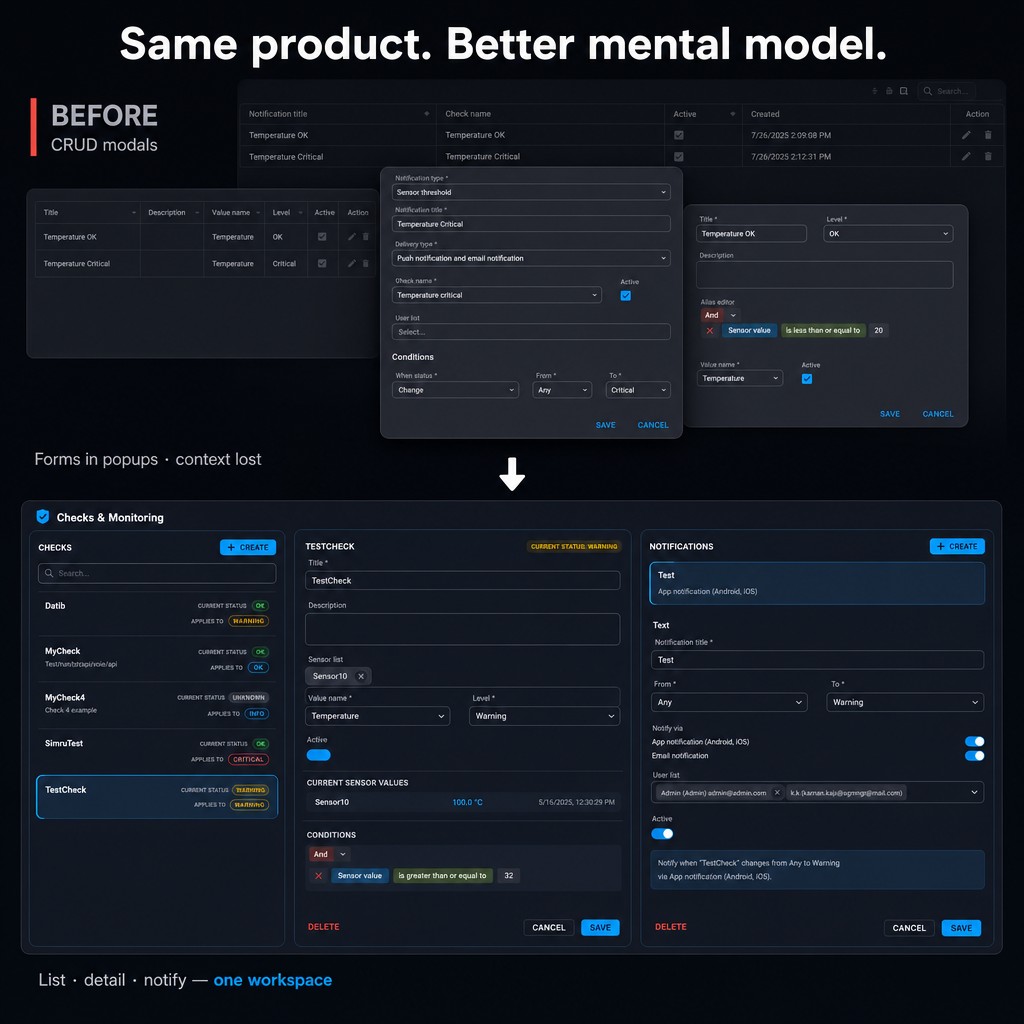
Before CRUD modals vs after: list, detail, and notify in one twinzo workspace for digital twin configuration

Same Product. Better Mental Model.

We are upgrading notification system setup in twinzo around a single workspace instead of a pile of CRUD modals.

The new flow is intentionally simple: list → detail → notify. One screen. Three panes. A progressive path you can finish without hunting for the next dialog.

• Checks — browse monitoring checks with live status (OK, warning, critical) so you always start from reality, not from an empty form.

• Detail — configure the selected check: title, description, sensors, current IoT values, and conditions in one continuous view.

• Notifications — decide when to fire, who gets it, and how (app, email), with a plain-language summary of what will happen.

You still create the same underlying objects. You just stop forcing users to think like your ORM.

That is what we mean by intuitive UX for digital twin configuration: the product still has depth, but the path through it matches human work order instead of schema order.

Pane One: Checks as the Starting Point

Everything begins with the list of checks. Not because "Check" is a table name, but because a check is the unit people actually talk about on the floor: "Is TestCheck still critical?" "Did Datib recover?" "Who owns SimruTest?"

Status badges turn the list into an operational surface, not an admin index. You can see OK, warning, and critical states while deciding what to edit. Configuration and monitoring stop being two different worlds.

This matters for adoption. If setup lives only in a buried settings area, it gets done once during implementation and then abandoned. If setup lives next to live status, people keep the twin accurate because they live inside it.

Selecting a check loads the rest of the workspace without opening a popup. That sounds small. It is not. Removing modal stacking is how you keep attention on one story from start to finish.

Pane Two: Detail Where IoT Data Meets Conditions

The middle pane is where digital twin configuration used to fall apart — and where it now holds together.

Here you set title and description, attach sensors, and build conditions. More importantly, you see current sensor values while you do it. A reading like "Sensor10 | 100.0 °C" sitting next to "sensor value is greater than or equal to 32" is not decoration. It is validation in context.

That is the practical meaning of putting IoT data in digital twins: live signals are not exported to a separate historian UI while rules live elsewhere. They sit in the same workflow as the decision you are making.

Condition builders stop being abstract boolean puzzles when the numbers are right there. You can ask obvious questions immediately. Is this threshold still meaningful for this line? Are we alerting on noise? Is the unit what we think it is?

For brownfield plants especially, sensors arrive from many sources — OPC UA, MQTT, gateways, custom integrations. The UX should hide that plumbing. The user should only meet the signal that matters for the check.

Pane Three: Notifications as the Last Mile

A smart factory is not a museum of KPIs. It is a plant where the right person learns about a status change before scrap, downtime, or a safety issue grows.

The right pane is built for that last mile of the factory notification system:

• Status transitions — notify when a check moves from any state to warning or critical, or whatever transition you care about.

• Channels — app notifications for Android and iOS, email, or both.

• Recipients — search and add users without leaving the flow.

• Plain-language summary — one sentence that confirms what you configured, so you can save with confidence.

That summary sentence is deliberate. Industrial UIs often assume the user reconstructed the full rule in their head. We prefer the product to say it out loud: notify when TestCheck changes from Any to Warning via app notification.

This is the difference between "we have a notification entity" and "we have a working factory notification system."

What Next → Next → Next → Forget Really Means

People sometimes hear "simple UX" and assume we want to remove power features. That is not the point.

Next→next→next→forget means the complexity stays available when needed, but the default path does not require understanding the whole model. You complete a coherent task, then you can stop thinking about the tool.

Forget is a feature. If an engineer has to reopen five screens every week to remember how alerts were wired, the system is taxing attention that should stay on production. Good configuration UX earns silence after setup.

That is also how you scale digital twin programs across sites. A twin that only the original integrator can reconfigure is a pilot. A twin that a local process owner can adjust is an operating system for the plant.

How This Helps You Make Your Factory Smart

Smart manufacturing is often sold as more data, more dashboards, more AI. Useful — but incomplete. A factory becomes smarter when signals turn into timely human or automated action.

Setting up this notification system inside twinzo closes that loop:

• Capture IoT data in the digital twin so values are spatially and contextually meaningful, not just rows in a historian.

• Define checks against live reality so thresholds stay honest.

• Route alerts to people who can act on mobile or email before a warning becomes downtime.

• Keep configuration maintainable so rules evolve with the process instead of freezing after project handover.

In other words: you can have IoT data in digital twins and actually use it to make your factory smart — not just visualize it.

A Note to Fellow Developers

If you build industrial software, this redesign is also a reminder to ourselves.

Knowing the entity model is a strength in the backend. It is a liability when it becomes the primary navigation metaphor. Users should not need your ERD to complete a workflow.

That does not mean hide everything or invent fake simplicity. It means group capabilities around jobs: monitor, decide, notify. Persist the entities behind the scenes. Expose relations only when the user is ready for them.

We still have entities. We still have APIs. We still care about integrity. We just stopped asking plant users to operate twinzo as if they were debugging our schema.

Why Digital Twin Configuration UX Is Strategy, Not Polish

Digital twin projects fail for many reasons: bad data, weak integration, unclear ownership. One quieter reason is configuration friction. If adjusting a threshold requires a ticket to IT or a consultant who remembers which modal to open, the twin ages out of usefulness.

Intuitive configuration UX is therefore strategic. It determines whether the twin remains a living operational system or becomes a demo that looked great at kickoff.

For twinzo, real-time 3D visualization and live data are only half the product. The other half is making those capabilities editable by the people closest to the process — including notification setup that turns signals into action.

What Comes Next

This notification workspace is one piece of a broader push: configuration that feels like a guided path, not an admin console. Checks and monitoring were the right place to start because they sit at the intersection of IoT, digital twins, and day-to-day plant response.

Expect more of the same philosophy elsewhere in the product. Same depth. Less modal archaeology. More next→next→next.

Make Your Factory Smart — Without the Modal Tax

If you already stream sensors into twinzo, this redesign is about unlocking that data faster for people who do not live in the backend. If you are still planning how to bring IoT data into digital twins, treat the factory notification system as part of the product — not an afterthought bolted on as CRUD.

The goal is simple: configure monitoring once, get clear alerts when reality drifts, and keep moving. That is how you make your factory smart with a notification system that matches how humans think — not how tables are joined.

Want to see checks, conditions, and notifications in one workspace? Get in touch and we will walk you through it.

You might also be interested in:

How telcos and police locate your SIM card

How telcos and police locate your SIM card

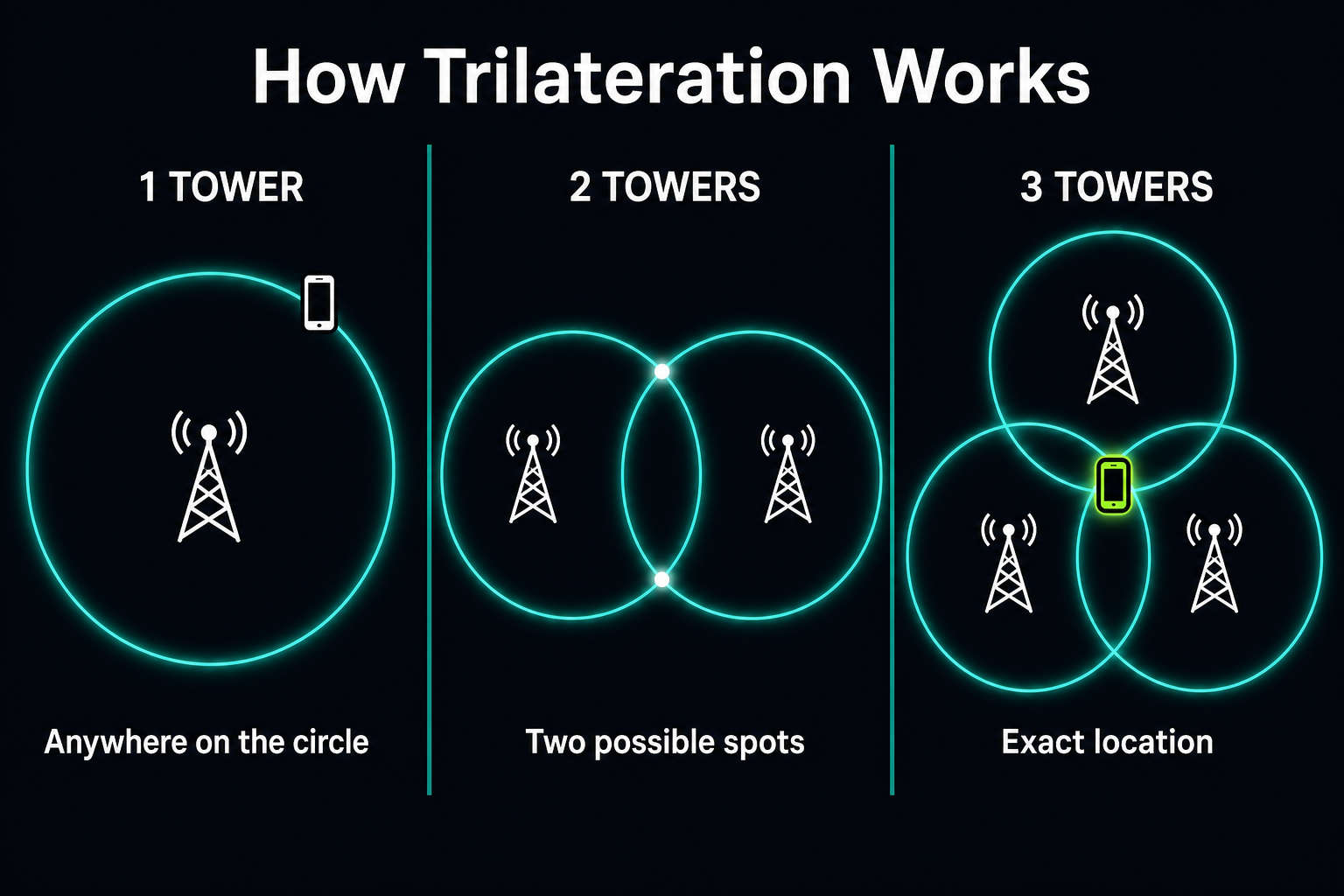
If you wonder how telco operators and police departments locate your SIM card, the answer is trilateration and triangulation. Here is how it actually works in three steps - and how Wi-Fi RSSI takes it from neighborhood to the exact room.

Read more
Strengthening Europe’s Defense Manufacturing

Strengthening Europe’s Defense Manufacturing

In an era of mounting geopolitical pressure and increasing defense budgets across Europe, the defense manufacturing sector finds itself under a new kind of scrutiny - not just for what it builds, but how efficiently it builds it. As nations accelerate rearmament programs and supply chains remain vulnerable, internal logistics has become a critical but often overlooked battlefield.

Read more

Landscape mode is not supported, please rotate your device.

By clicking “Accept”, you agree to the storing of cookies on your device to enhance site navigation, analyze site usage, and assist in our marketing efforts. View our Privacy Policy for more information.