Blog

Live 3D Stock From ERP Without Installing RTLS

Bin coordinates from ERP or WMS become live positions in the 3D twin - without tagging every pallet.

  • Patrik Pasko

  • August 26, 2026

twinzo logistics analytics on a phone
Live 3D Stock From ERP Without Installing RTLS

Bin Coordinates, Just Like IKEA

In IKEA you find stock in an open warehouse by coordinates, like 13-B. Same for a lot of industrial warehouses: aisle, rack, level, bin - already in SAP, WMS, or another ERP. Feed this data to twinzo and you get real-time 3D visualisation of stock positions, without installing RTLS infrastructure.

Map those bins to the twin once. When a putaway, transfer, or pick updates the location in the warehouse system, the pallet moves on the 3D model. Operators open the hall and see where goods sit - same coordinates, spatial picture.
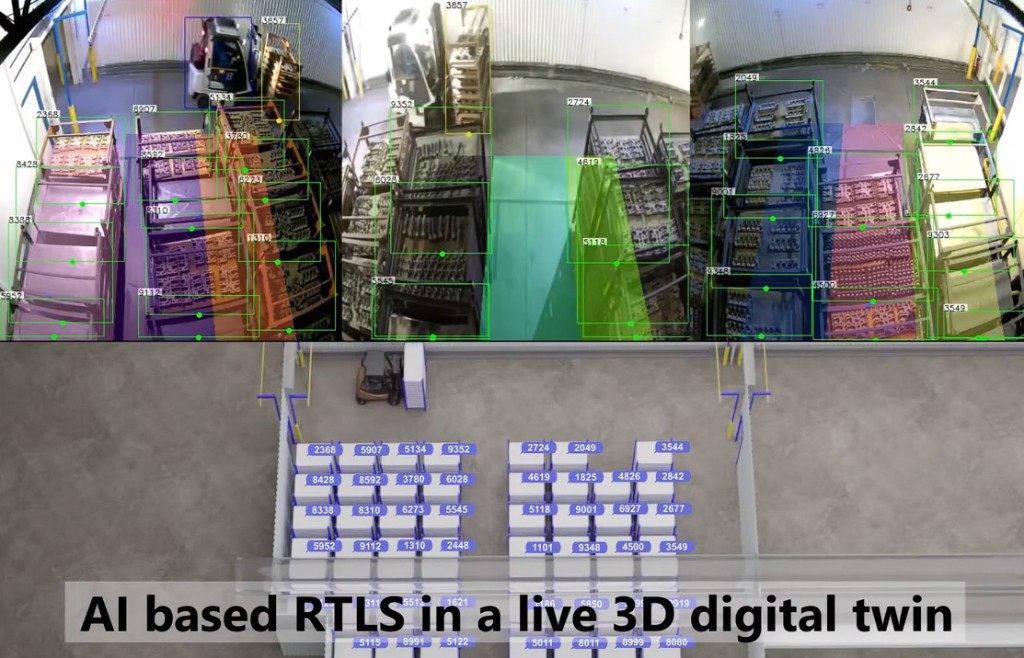
AI camera IDs mirrored as stock blocks in a live 3D digital twin

Picks and Moves as Live 3D Events

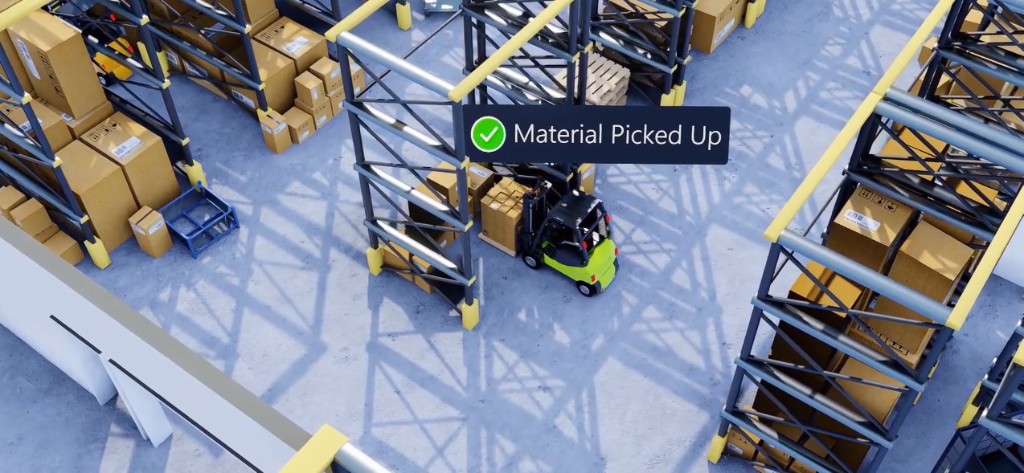
Stock is not only a static bin. Every confirmed pick or transfer is a movement you already book in ERP or WMS. Push those events into the twin: a forklift confirms "material picked up" - the pallet leaves the rack in 3D and rides with the vehicle or jumps to the next buffer; putaway closes - it drops on the target location. Live stock visualisation from transactions you already capture. No extra hardware on the goods for that flow.

3D warehouse twin showing Material Picked Up on a forklift with pallet

What You Connect From ERP, SAP, WMS

You do not rebuild the warehouse system. You stream the events that already matter:

• Goods receipt / putaway - create or move the pallet to inbound, quarantine, or rack location in the twin.

• Transfer / relocation - update the 3D position when the bin changes in SAP or WMS.

• Pick / issue to production - show the material leaving storage and arriving at the line-side buffer.

• Inventory adjustment - keep the twin honest when a count changes the book stock.

Map ERP storage bins and areas to twinzo locations and zones. Once that map exists, every transaction that updates a bin can update the 3D picture. SAP, other ERPs, WMS, MES - same idea: if the system knows the coordinate, the twin can show it.

When Book Stock Is Not Enough: Count the Buffer

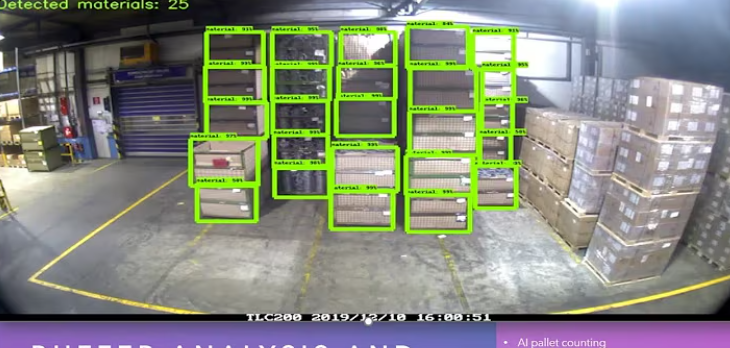
ERP locations lag when people skip scans. Buffers fill with mixed pallets - the book says 18, the aisle looks full of something else. Cameras already hang over many buffers; AI pallet counting on that feed gives you a live count and positions without sticking a tag on each unit. Feed that count into the same twin as your ERP stock so planners see book stock and visual stock together. When they diverge, you fix the process - not start an RTLS project for every SKU.

AI pallet counting on a warehouse camera: material detections and count overlay

Cameras as Location Without Tags

For denser floors, AI on existing CCTV can assign IDs to pallets, racks, and forklifts and mirror them into the 3D twin - same IDs in the camera view and on the model. That is location awareness without rolling out BLE, UWB, or RFID on every load. Combine it with ERP identity (SKU, HU, order) and you know both what it is and where it sits. Use it where tags are expensive or impractical; keep classic RTLS for assets that must be tracked continuously at high precision. Most warehouse stock never needed that - it needed a live picture.

Overhead AI detections with matching IDs on pallets and forklift in the 3D twin

Areas, Alerts, and Stock That Breaks Rules

Once stock has a position in twinzo, the same area tools apply as for tracked devices:

• Area occurrence - how long critical materials sit in inbound, quarantine, or line-side buffers.

• Wrong-zone alerts - pallet confirmed into a no-go or wrong production cell triggers a notification.

• Empty / overflow buffers - camera count or ERP transfers that push a zone past a threshold fire before the line starves or the aisle blocks.

You are not only looking at pretty 3D boxes. You act when stock is in the wrong place.

Other Cases That Fit

• Line-side kanban - ERP issues refill; twin shows the buffer filling so logistics sees demand without a second spreadsheet.

• Quarantine and quality hold - blocked stock stays visually marked in 3D until release in SAP.

• Cross-dock - inbound HU never goes to rack; twin tracks dock → staging → outbound from WMS scans alone.

• Multi-hall plants - same ERP company code, stock positions split across halls on one twin so planners stop guessing which building.

Start From the Data You Already Have

Next shortage hunt or buffer argument: map a few ERP bins to the twin, stream transfers and picks, and let the floor see stock in 3D. No RTLS install on every pallet required for that picture - add AI counting or camera location where scans are weak, and keep tags for the assets that truly need them.

That warehouse picture sits next to material order automation and assets without live tracking. Get in touch if you want to walk through this on your own warehouse model and ERP events.

You might also be interested in:

Add Assets to Your Digital Twin Without Live Tracking

Add Assets to Your Digital Twin Without Live Tracking

A supplier truck has no RTLS tag, but operators still need to see where it is. Place it in 3D, simulate the path, run area analytics, and notify on no-go zones. Same for stock positions of important goods.

Read more
Quuppa BLE in a 3,000-Visitor Office Twin

Quuppa BLE in a 3,000-Visitor Office Twin

Reception knows who badge-scanned. Facilities still cannot see who is in the server room, which meeting room filled, or which parking bay is free. Quuppa BLE positions land on the twinzo 3D building so security, HVAC, and visitors work from one picture.

Read more

Landscape mode is not supported, please rotate your device.

By clicking “Accept”, you agree to the storing of cookies on your device to enhance site navigation, analyze site usage, and assist in our marketing efforts. View our Privacy Policy for more information.