Blog

Quuppa BLE in a 3,000-Visitor Office Twin

Quuppa tags on people and assets become live positions in twinzo: server-room access, meeting-room occupancy, parking, and indoor paths.

  • Patrik Pasko

  • August 26, 2026

twinzo logistics analytics on a phone
Quuppa BLE in a 3,000-Visitor Office Twin

3,000 People at Reception, No Shared Map

Reception at a campus HQ is already stacked at 8:40. Three thousand people will come through today: employees, contractors, and visitors looking for a meeting room they have never seen. The badge system knows who passed the turnstile. It does not tell facilities who is standing in the server room, which booked room actually filled, or which parking bay is free. Security still radios. Reception still sketches arrows on a paper map. HVAC still cools empty rooms because the calendar said occupied.

A visitor lands at the desk with a 9:00 in room 4.12. Reception cannot see if 4.12 filled, or how to walk there from the lobby without crossing a restricted IT corridor. The parking lot is already circling. The host is in another building. That is a 3,000-person day with no shared live map of the site.

Quuppa BLE tags give indoor positions. twinzo puts those tags on the 3D building the same way it puts tagged forklifts on a plant floor. Reception, security, and the visitor phone work from one picture.

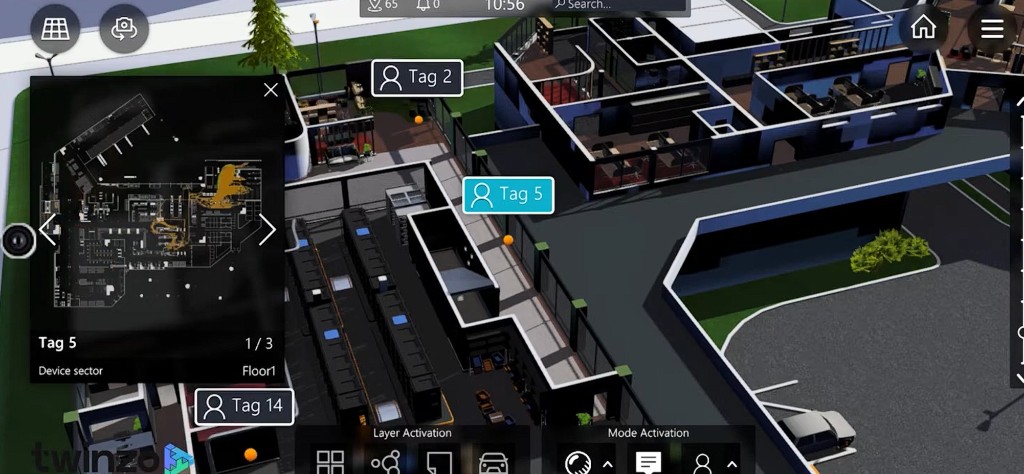
Live Quuppa BLE tags on a twinzo 3D office floor with server room and selected tag details

Who Walked Into the Server Room

ISO 27001 and SOC 2 treat the server room as a restricted physical area. A badge click at the door is the usual control. It does not tell you who is still inside after the door closed, whether a contractor lingered in the rack aisle, or whether a visitor badge followed someone in. On a campus with thousands of people a day, tailgating is not rare; it is the failure mode access logs miss.

Put a Quuppa tag on the badge or the person. Draw the server room as a restricted or no-go area on the twin. When a tag enters, twinzo shows the live position in 3D and can fire the same notification path you use for a forklift in a pedestrian lane on logistics optimization. Security sees the tag on Floor 1 in the rack row, not only a timestamp on a card reader. After hours you replay who walked that aisle.

Quuppa Tags on the twinzo Map

Quuppa locators on the ceiling read BLE Angle of Arrival from tags. The Quuppa Positioning Engine outputs coordinates at sub-meter accuracy, which is why this stack is used for people and assets indoors when GNSS is useless. twinzo maps those devices onto the office model - desks, corridors, parking, server rows - so a tag is a first-class position, not a spreadsheet of XY. The same live layer powers twinzo features you already use on a plant floor.

1. Tags and locators - badges, visitor tags, or asset tags in range of Quuppa locators.

2. Stream positions - Quuppa sends live coordinates into twinzo.

3. Place them on floors and areas - Floor 1, server room, meeting wing, garage.

4. Turn on the jobs - restricted-area alerts, occupancy, parking layer, guide paths in the app.

You are not running a separate location dashboard next to the building model. The tag is already on the twin the FM team uses.

Meeting Room Booked, Nobody Inside, AC Still On

Facilities still keys HVAC and AV off the calendar. ASHRAE occupancy-based HVAC exists because an empty room on Outlook still gets full cooling and a panel boot. On a 3,000-person campus the mismatch is daily: rooms booked as buffers, no-shows, people who took the call from a desk. Energy and AV run for a booking, not for a body in the chair.

Presence from the BLE tag - or the phone in the twinzo app - is the occupancy signal. Room goes occupied: boot the meeting panel, set the setpoint. Room empty past a dwell threshold: drop the AC, leave the lights. Same area occurrence you already use on a plant buffer: how long was 4.12 actually used versus booked. Workplace and FM stop arguing from the calendar and look at dwell.

Visitor Needs a Path, Not a Floor Number

"Floor 2, sector B" is not a route. Indoor GNSS does not work. The visitor still walks the wrong wing and hits a locked IT door - or a server-room corridor they should never see. Reception cannot walk every guest. On a 3,000-visitor day that is hours of lost meetings and extra badges at the desk.

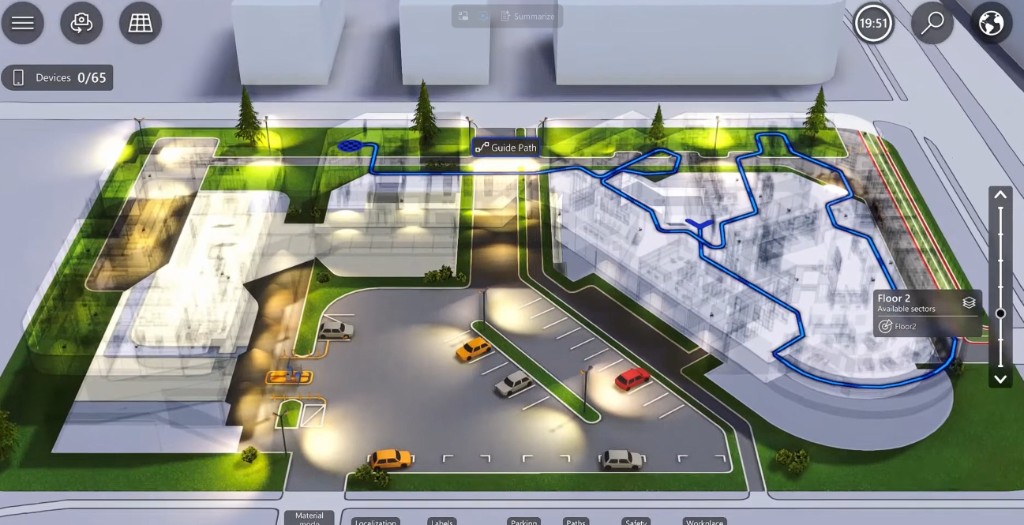
Draw a guide path on the twin: lobby → elevator → corridor → room. Same 3D model security uses for tags. On the smartphone the visitor follows the line from the courtyard or the parking bay into the floor. Restricted sectors stay out of the route because they are already areas on the twin. You do not maintain a second wayfinding app beside the location picture.

Guide path from courtyard into a multi-floor office twin in twinzo

Parking Bay Before They Circle the Lot

Peak arrival: visitors circle the lot while the 9:00 already started. Parking search time is a known delay at large campuses; the bay state usually lives in a different system than the meeting invite, so reception still says "try the south lot."

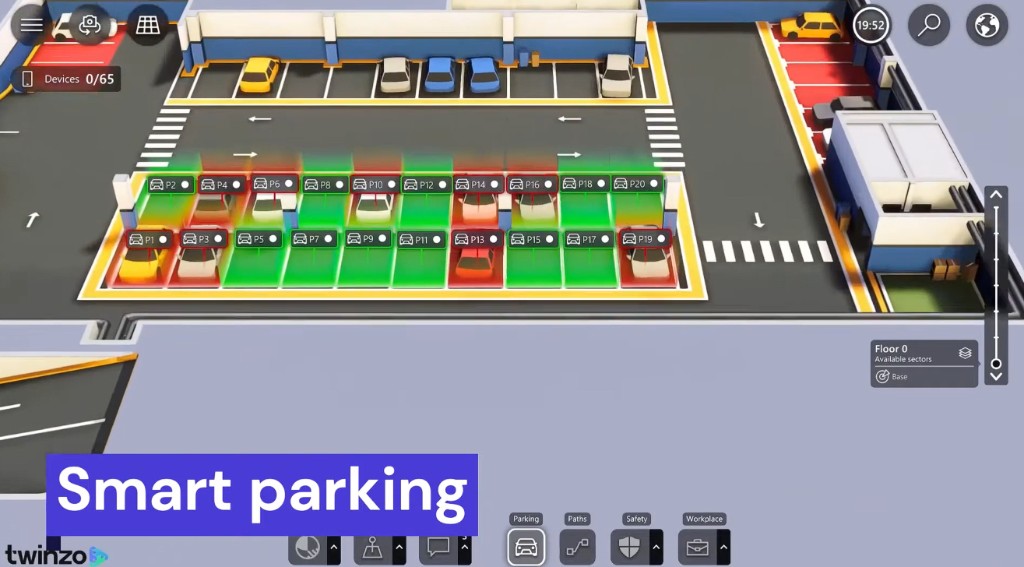
The parking layer on the twin shows free versus taken bays in 3D - green open, red occupied, labels on the stall. That view is in the same smartphone app as the indoor path. The visitor picks a free bay before they leave the road, then follows the guide path from that stall to the room. Facilities sees occupancy of the garage the same way they see occupancy of Floor 2.

Smart parking layer in twinzo with free and occupied bays P1 to P20

Replay the Morning: Who Walked Where

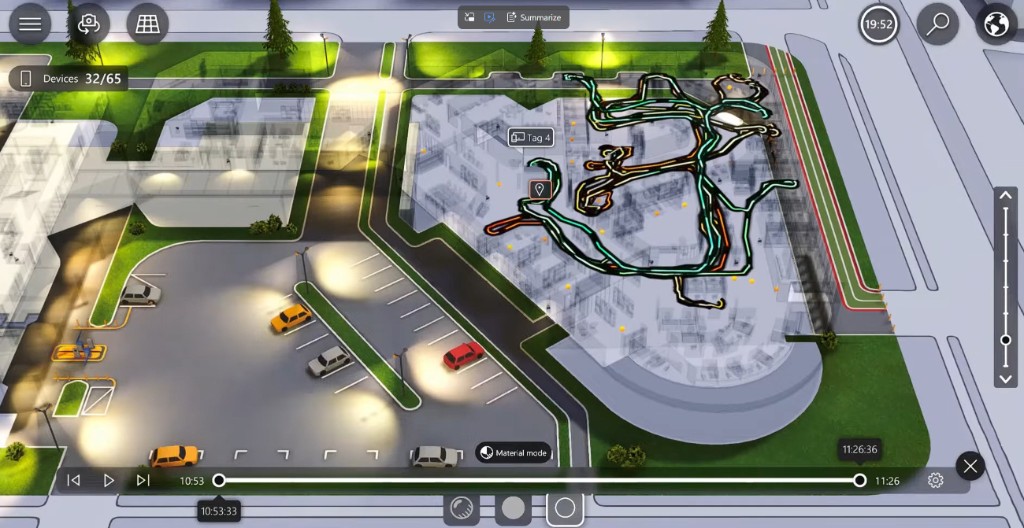
Live tags answer now. After a congested lobby, a server-room incident, or a complaint that Floor 2 is always full, you need the path people already took. Quuppa history in twinzo replays as a spaghetti of tracks over a time window - same stack as live tracking, not a separate video wall.

Area occurrence and dwell sit on those tracks. Which corridors filled between 10:53 and 11:26? How long did tags sit in meeting rooms versus walk through? Did anyone enter the server room after hours? FM uses it for cleaning routes and HVAC setbacks. Security uses it after an incident. Workplace uses it to see which floors actually filled, not which floors were booked.

Movement history spaghetti of Quuppa tags replayed on the twinzo office twin

Other Cases on the Same Tags

• Contractor in a no-go wing - visitor or vendor tag enters a restricted floor; notification to security, same rule as server-room entry.

• Mustering on alarm - who is still inside versus already in the assembly zone, instead of a clipboard at the gate.

• Cleaning and FM routes - replay which rooms actually had occupancy so crews skip empty floors.

• Shared AV carts and equipment - tag the cart; find it on the twin instead of calling three floors.

• Host walking to the guest - both on the map so reception stops guessing which building.

Walk It on Your Own Building

Next visitor peak, server-room audit, or parking complaint: stream Quuppa positions into the office twin, draw the restricted rooms and parking bays, and let security, FM, and the smartphone app work from the same map. For a plant-floor RTLS primer, see getting started with RTLS.

Get in touch if you want to walk through this on your own facility model.

You might also be interested in:

Live 3D Stock From ERP Without Installing RTLS

Live 3D Stock From ERP Without Installing RTLS

In IKEA you find stock by coordinates like 13-B. Same in industrial warehouses. Feed those locations to twinzo for real-time 3D stock positions - no RTLS infrastructure.

Read more
How telcos and police locate your SIM card

How telcos and police locate your SIM card

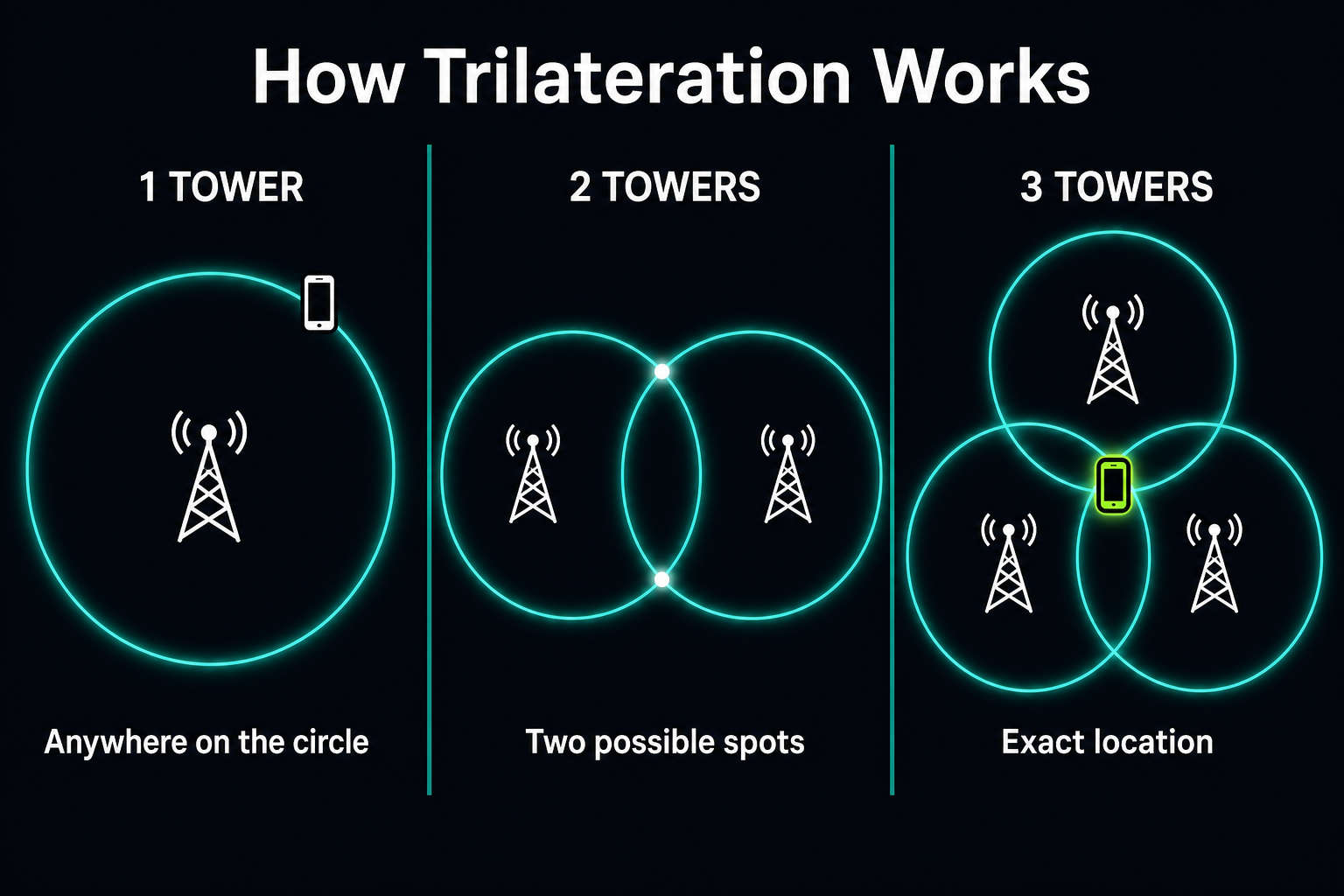
If you wonder how telco operators and police departments locate your SIM card, the answer is trilateration and triangulation. Here is how it actually works in three steps - and how Wi-Fi RSSI takes it from neighborhood to the exact room.

Read more

Landscape mode is not supported, please rotate your device.

By clicking “Accept”, you agree to the storing of cookies on your device to enhance site navigation, analyze site usage, and assist in our marketing efforts. View our Privacy Policy for more information.