Blog

Agent-Driven Factory: Space Context, Then Logistics Commands

Connect plant systems on the twin, expose them to agents via MCP, join by position and area, then send logistics activity commands through twinzo SDK.

  • Patrik Pasko

  • September 8, 2026

twinzo logistics analytics on a phone
Agent-Driven Factory: Space Context, Then Logistics Commands

How the Stack Works

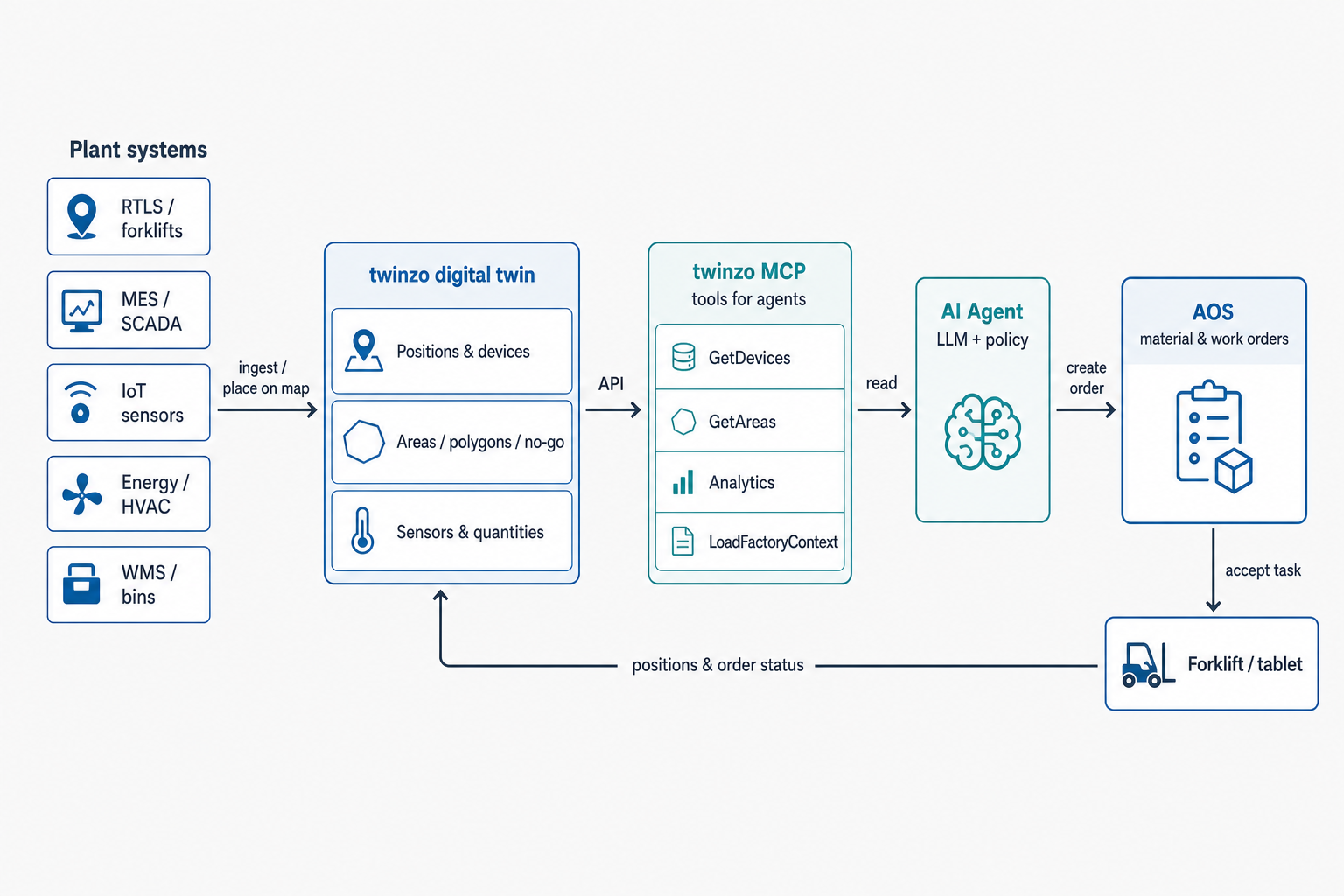
An agent-driven factory on twinzo is three layers. Independent plant systems land on the digital twin with positions, areas, and polygons. A sensor and its data sit on a specific position or in a specific area, same as devices and IoT tags. twinzo MCP exposes that model and analytics as tools an LLM can call. The agent then issues logistics activity commands (material call-offs, maintenance jobs, pickup tasks) through twinzo SDK into the same ordering path tablets already use.

That ordering path is AOS, twinzo's Automated Ordering System. Think of it as the queue that turns a decision into work a forklift driver or maintainer accepts on a tablet. Agents do not invent a parallel radio channel. They become another authorized caller on AOS.

Plant systems stay separate. RTLS, MES, IoT, energy, HVAC, and WMS do not need one vendor stack. twinzo is the spatial bus. The agent is the reader that can also create the next logistics command. Every important signal has an address on the map. Every agent action that moves metal goes through AOS.
Architecture: plant systems into twinzo, MCP to AI agent, logistics commands to forklift tablet

One Spatial Picture for Ops

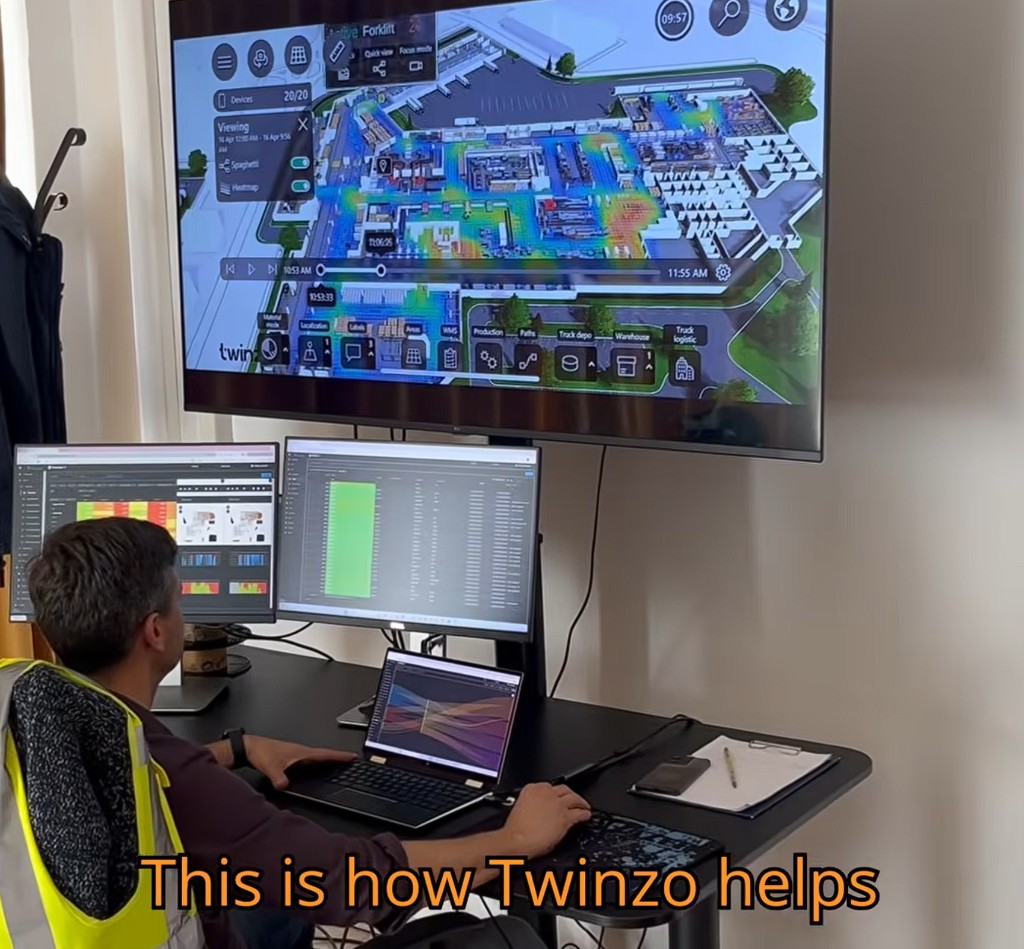
Operators already run the plant from the twin: material flow, localization, areas, production, paths, warehouse and truck logistics on one hall view, with analytics on the side screens. That is the same picture agents need. MCP does not invent a second model. It exposes the live twin and the analytics stack people already trust.

The public twinzo API covers the building blocks: devices and positions, dynamic locations, sensors and sensor data bound to those places, layers, beacons, sectors, localization payloads, configuration, and variables. MCP sits on top of twinzo SDK commands so the agent does not hand-roll every HTTP call. It loads factory context, asks sharper analytics questions, then posts the logistics activity command.

Operator at twinzo ops screens with 3D hall heatmap and analytics dashboards

Space Is the Join Key

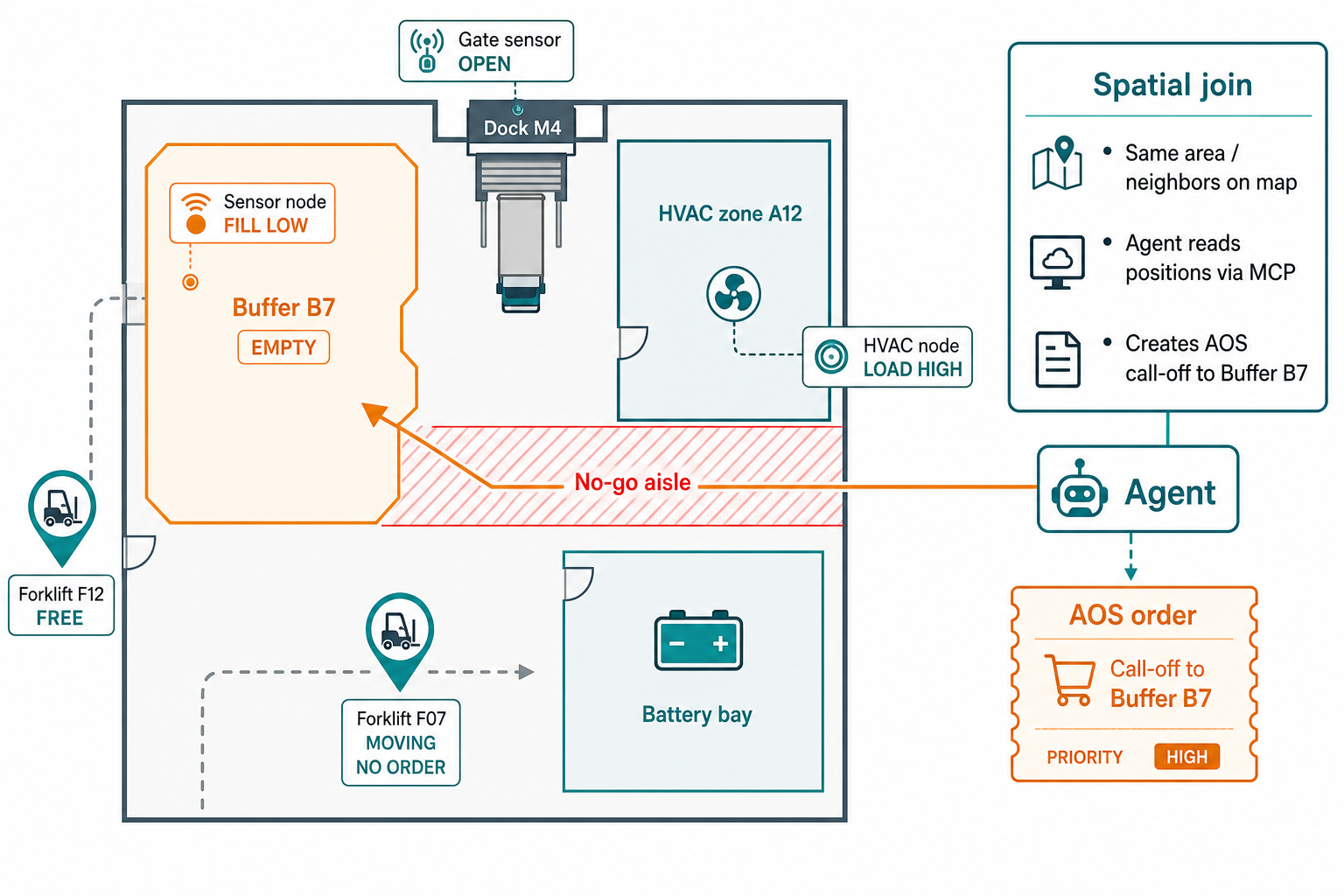
Agents fail when every signal is only a flat tag name. Temp_A12 and Gate_M4_21 mean nothing together until they share a wall on the model. twinzo forces that knowledge: devices have positions, areas are polygons, layers carry no-go rules, sectors match how the plant talks. A sensor and its readings sit on a specific position or inside an area polygon, so fill, temperature, gate state, and energy are not floating tags. They are neighbors on the floor the agent can query.

Near becomes a tool answer: distance on the layout, or membership in the same buffer, dock, or energy lane. That is how you monitor systems that were never meant to talk, the same pattern as correlating plant systems by space. Place MES or SCADA tags the way plants already do with Ignition on the twin, put logistics and IoT beside them, and the agent can ask which neighbors misbehaved in the same window.

Policies stay short because the model already speaks floor English. Buffer polygon empty and nearest free forklift outside that sector: create a material call-off. Gate open past dwell while HVAC still conditions the zone: notify dock and facilities. Device moving without order past a threshold: empty-ride attention for the shift lead.

Floor schema: empty buffer, free forklift, sensors, spatial join to logistics call-off

What twinzo MCP Exposes

The twinzo MCP server is the agent toolbox. Through the Model Context Protocol it turns twinzo SDK commands and factory analytics into named tools. Load factory context in one shot: localization layers, areas, devices, shifts. Resolve a shift window for a real day. Pull a compact shift summary with OEE, pending orders, and empty-ride attention devices. Run anomaly analysis across downtime, no-go, stale orders, and empty rides.

Day-to-day reads cover the objects operators already argue about: areas, devices, layers, sectors, beacons, sensors and their data at a given position or area, paths, and orders for a time range. Device location history when you need the path. Grid area occurrence and sector occurrence for dwell and congestion. Device statistics, downtime bundles, activity summaries, order analytics, and package rides for fleet behavior versus logistics work on AOS.

Without MCP, every AI project reinvents plant plumbing. With it, the same branch, positions, and AOS queue humans use become the agent's ground truth. That is what turns 'we have a digital twin' into 'an agent can operate against our twin.'

Agent Loop: Context, Space, Then Command

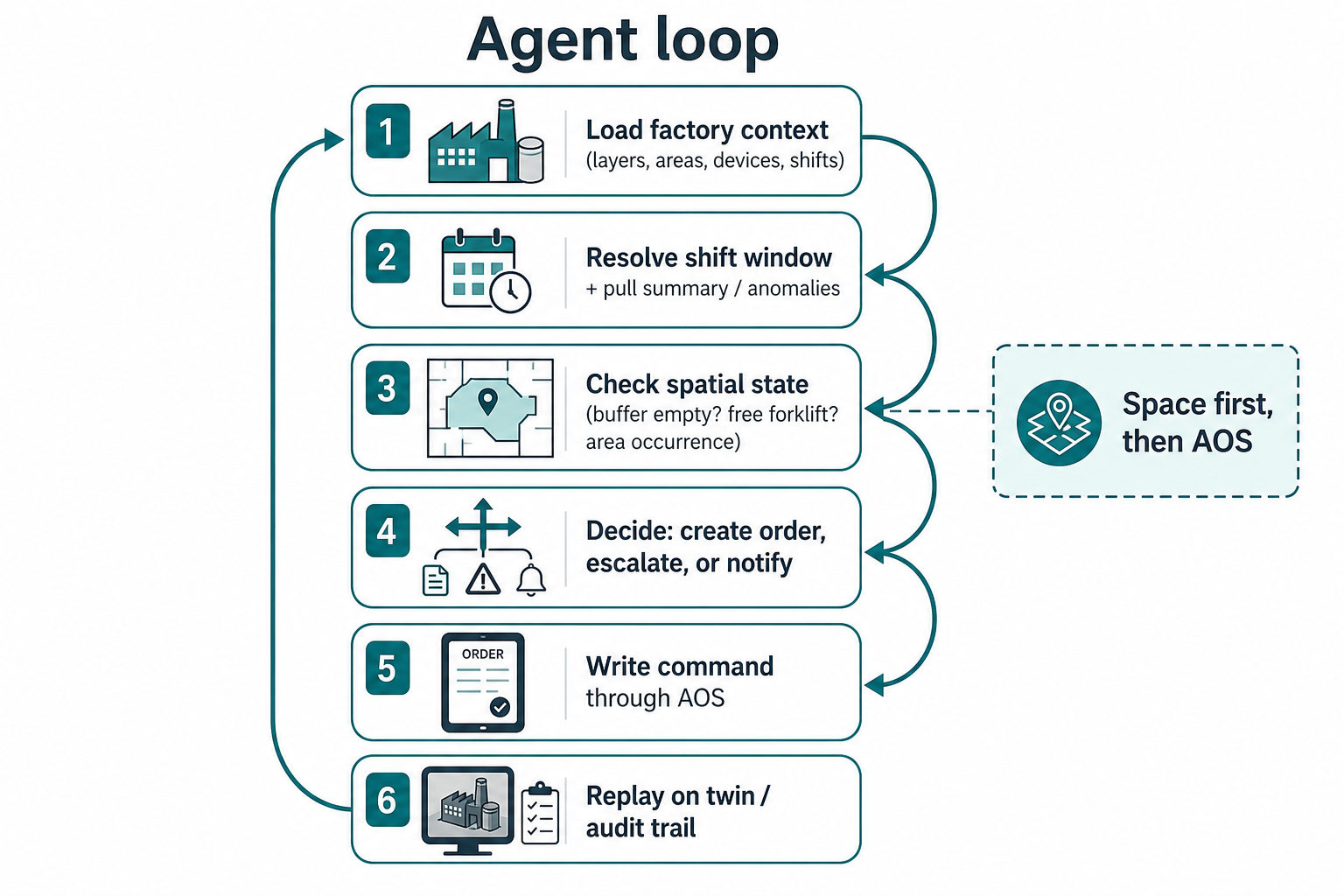
The useful loop is boring on purpose. Load factory context. Resolve the current shift. Pull summary and anomalies. Check spatial state: buffer fill, free devices, area occurrence, pending orders in that sector. Decide create, escalate, or notify. Write the logistics activity command through twinzo SDK into AOS. Leave an audit trail people can replay on the same map.

Analytics come before metal moves. Device statistics expose with-order versus without-order time. Area and sector occurrence show which zones ate the shift. Order analytics and downtime orders expose the AOS lifecycle so a pending call-off is not a rumor. Package rides separate empty travel from loaded work. Those are the same questions twinzo features already answer for people. Agents call them as tools.

Heuristic fallbacks still help from raw location history: utilization, area traffic, route analysis, fleet dashboards from playback. Use them when you need a second opinion beside live AOS and backend analytics.

Agent loop: load context, shift summary, spatial check, decide, logistics command, audit

Logistics Activity Commands Through AOS

Insight without a handoff dies on the radio. AOS (Automated Ordering System) is how twinzo turns a decision into logistics activity commands drivers and maintainers already accept. Material call-offs, chained work, tablet acceptance: the agent is another authorized caller on that queue, not a new logistics app. See also material order automation and AOS as part of the digital twin.

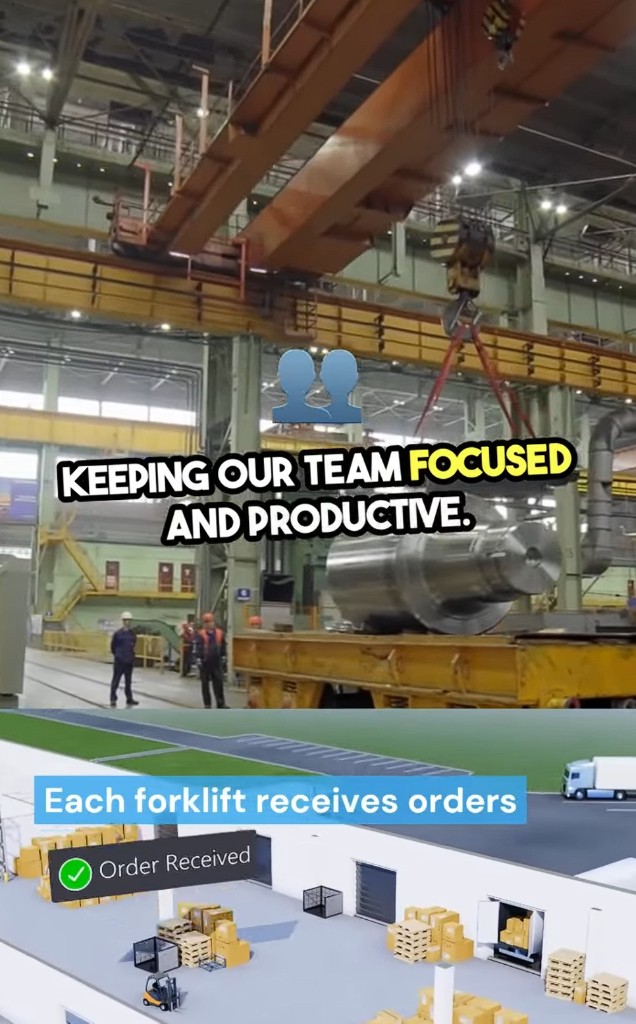
On the twin, each forklift receives those orders the same way it does today. The agent posts the command via twinzo SDK. The tablet shows Order Received. Logistics does not learn a new UI. Production gets metal moving without waiting for someone to notice an empty stand on a walk.

Example path: buffer sensor reports below Kanban on the twin. Agent finds no open order for that SKU, finds free trucks outside the pocket, posts the call-off into AOS with the destination area the polygon already defines. Same write path for maintenance-style flows when AOS is configured for them: machine pin plus nearest free role. Destination is an area on the twin, not a hallway nickname only one shift understands. Empty-ride and no-go cases from internal logistics optimization follow the same rule: space first, then the command.

Plant floor next to twinzo view where each forklift receives an order

Wire It on an Existing Branch

1. Place the signals - devices, sensors (and the data they publish), MES or IoT tags, buffers, gates, and energy nodes get a position or an area on the twin.

2. Keep AOS as the action bus - logistics activity commands stay in the Automated Ordering System operators already accept on tablets.

3. Connect twinzo MCP - point the MCP server at your API client and branch so agents can call twinzo SDK tools for context, analytics, and orders.

4. Start with one job - empty buffer call-off, empty-ride attention, or open-gate plus HVAC neighbors. One policy, one owner, one replay.

5. Require spatial checks - every agent action that moves people or metal resolves areas, positions, or sectors first, then writes the logistics command second.

You do not wait for a perfect enterprise AI platform. Make the factory addressable for production monitoring and logistics, then let agents use the address book.

Ownership and Guardrails

Give each policy a named owner on site. Logistics owns truck acceptance. Production owns buffer thresholds. Facilities owns open-door energy waste. The agent must not become a fourth dashboard with no owner. Quiet hours, replay in the daily ops meeting, coach bad call-offs like any other process miss.

KPIs stay on the map: line wait after buffer empty, pending order age on AOS, empty-ride minutes, open-door dwell next to conditioned zones, no-go entries. Those numbers already exist across twinzo analytics and AOS. The agent keeps them current between human reviews.

Safety stays hard. No-go layers, barriers, and role-based AOS flows remain the guardrails. An agent that can see no-go and still create a delivery into a forbidden polygon is a configuration bug. Agent writes go through the same rules tagged devices already use.

Jobs That Fit This Pattern

• Stale logistics order near a free truck - escalate assignment instead of aging the call-off.

• Smart bin full with no visit in the area - create pickup before the aisle blocks.

• No-go entry on a live device - notify with the position already on the twin.

• Battery bay congestion while cells starve - rebalance using sector occurrence.

• Maintenance request with machine pin - route work to the nearest free role.

• GPS outdoor to indoor handoff - trailer to gate, then indoor twin into the dock flow.

Start With One Spatial Policy

Pick one join: empty buffer versus free forklift, pending logistics orders versus empty rides, or open gate versus HVAC. Place the signals, connect twinzo MCP, keep AOS as the command path for logistics activity. Independent systems stay independent. Space is what makes them agent-ready together.

For the hands-on ordering setup without agents, use the automate your orderings tutorial. Get in touch to walk an agent through your facility model, MCP tools, twinzo SDK commands, and AOS flows.

You might also be interested in:

No previous posts
Back to all posts
On-Premise twinzo on an Air-Gapped Plant Network

On-Premise twinzo on an Air-Gapped Plant Network

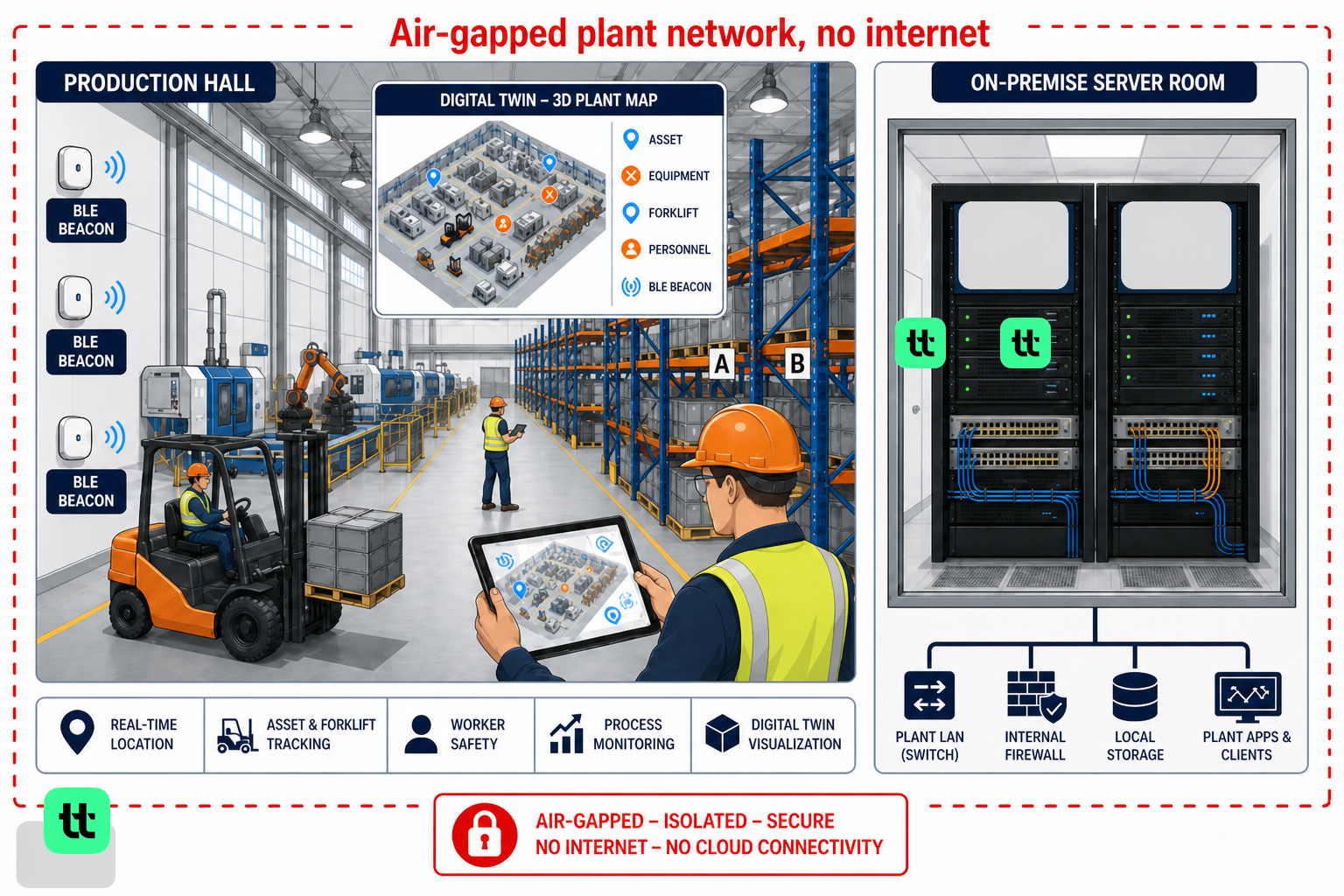
Defense, aviation MRO, and nuclear-adjacent sites cannot point live tracking at a public cloud. twinzo runs fully on two Linux VMs inside your isolated LAN. Your IT owns DNS, TLS, and the VMs while operators keep the same 3D twin, RTLS, and alerts.

Landscape mode is not supported, please rotate your device.

By clicking “Accept”, you agree to the storing of cookies on your device to enhance site navigation, analyze site usage, and assist in our marketing efforts. View our Privacy Policy for more information.