Operational digital twin vs forklift maker fleet platforms
A forklift maker's fleet portal reports hours, impacts, faults, and sometimes a coarse outdoor point. An operational digital twin leaves that portal in place, takes those telematics signals onto the same truck record, and adds the indoor path plus the load context the portal's counters cannot supply.
What the maker portal is for
The default package is forklift telematics. A unit on the forklift feeds the maker's portal with an hour meter, impact events from a shock sensor, controller fault codes, and usually an operator login or pre-shift check. Some packages add a last reported outdoor location or a site geofence aimed at theft and yard presence. That is honest industrial fleet management for maintenance timing, damage follow-up, and who is allowed to drive. Many plants already pay for it inside the lease or the service contract.
It is not forklift tracking of aisle motion, and it is not a live model of internal logistics. The portal was built as an equipment record. Replacing it in order to "get a twin" throws away a maintenance feed that still belongs on the truck. The twin extends that record. It does not reprint it under a new name.
What an hour meter can and cannot say
An hour meter counts key-on time, or drive-and-lift time, depending on which counter the truck exposes. Service plans use it the way a road fleet uses an odometer. A two-shift truck ages faster than a parked spare, so preventive maintenance follows hours rather than the calendar alone. That use is correct, and a location project should leave that service use in place.
The same number is only a rough activity total. It rises when the truck carries a load, when it drives empty, and often when it sits powered at a dock. Plants that measure forklift use already keep three clocks apart: key-on hours, time the truck is actually moving, and time that motion meets an agreed definition of useful work. A standard hour meter guarantees the first clock. It has no aisle, no buffer, and no load label, so it cannot separate a truck that fed the line from a truck that looped. Empty travel, aisle waits, and dwell never appear as their own lines on an hour report. Forklift fleet optimization built only on hours can rank trucks by runtime and still cannot show whether that runtime was useful.
Why the outdoor point does not place the truck in the hall
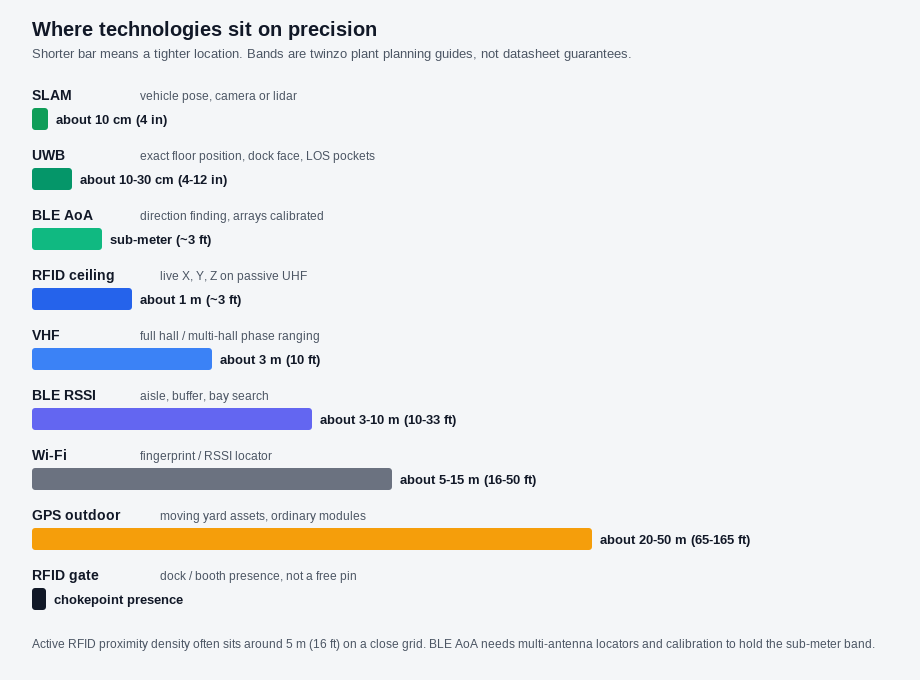
When the portal shows a map, the usual source is GPS or the wider GNSS family, sometimes only a last outdoor fix. Satellites need sky. Under a steel roof the fix drops or wanders. On moving yard assets with ordinary modules, reported locations commonly jump about 20–50 m (65–165 ft). That band can still mark which lot or which large outdoor zone a truck is in. It cannot place the truck in an aisle or a bay, where the useful reading is medium precision of about 1–3 m (3–10 ft).
Some indoor "locations" are coarser still: a point frozen at the door, or a cellular presence that only says the truck is somewhere on the site. Neither is an indoor positioning system. Aisle, buffer, and bay work needs a hall real-time location system (RTLS). Coarse zone presence, meaning which wing or which gate, is a different and lower-accuracy indoor job. Exact floor position is a third job, used when the question is whether the truck is on a specific spot, not for every utilization question. Outdoor GPS as a peer technology is under GPS for RTLS. The dock handoff between yard and hall is under outdoor yard GPS vs indoor hall track.
What extra charts on the same signals still cannot create
The portal can add more reports on hours, impacts, and the outdoor point it already stores. Those signals do not contain a continuous path across the hall, a join from that path to a material move or a line wait, or a retained spatially oriented dataset. Without place and time together there is no honest spaghetti diagram, no heat map of where trucks waited, and no fleet saturation by bay. Correlation and causality analytics that ask which empty loops keep showing up before a line wait have nothing in the hour file to read.
Live logistics, the stored place-and-time record, and correlation on that record have equal weight. Live logistics needs the free truck and the empty loop on this shift, which is the job of internal logistics optimization. The stored place-and-time record is what a later review reopens. Correlation uses that stored record to see which empty loops keep preceding a line wait, so the team can change routes and buffers after hours have already answered whether to lease another truck. A ranking by hours serves the service desk. It does not serve those three uses, and another export of the same counter will not.
Mixed makers make the gap plainer. Each portal keeps its own hour and impact list. None of them is the shared hall. If a maker later adds indoor anchors, that radio is a new location system, not a menu inside the hour portal. Anchors still do not give one hall model for every brand, a join from the path to the material move, or correlation on a stored place-and-time record. Those stay on the operational digital twin. When a tagged fleet is worth buying is under when RTLS makes sense for forklifts. A different comparison, live operations versus offline what-if, sits under operational digital twin vs simulation platforms.
Keep the portal and put its signals on the twin
Twinzo does not replace the maker portal. The portal stays the record for hours, impacts, faults, access, and outdoor theft fences. Those forklift telematics signals can be fed into twinzo and shown on the same truck record as the live indoor location, the same way MES, WMS, and ERP stay systems of record while the twin adds place. That is an integration, not a second fleet product that reprints the hour list. How plant feeds land on one model is on integrations.
With location on the hall, forklift tracking can split useful motion from empty motion, as set out in loaded vs empty travel you can prove. The same positions answer which truck is free near the wait, covered in where the free forklift actually is. Manufacturing RTLS is the location feed for that logistics work. The operational digital twin is the shared hall those feeds use, including the stored record and the later pattern work, not only the live search. A 3D picture that only redraws hour meters, or a stale outdoor point, is not a digital twin for logistics. That picture still lacks the indoor path, the join to the material move, and the stored place-and-time record. 3D visualization for manufacturing earns its place when the path, the task, and the telematics signals sit on one truck record the shift can open.
How to tell the two buys apart
1. Maintenance and access stay on the portal - Service due, fault codes, impact follow-up, and who logged in are already answered. Do not buy a twin to replace that list.
2. Aisle place and useful motion need indoor location - Which bay, how much empty travel, where trucks dwell, and which truck is free near the work are not in the hour file or in a 20–50 m (65–165 ft) outdoor fix. They need a hall RTLS, usually at 1–3 m (3–10 ft) for aisle and buffer jobs.
3. Feed the portal's telematics into the twin. Do not stand up a second hour system - Pass criterion: one truck object shows maker hours and impacts beside a continuous indoor path, and that path is kept as history for later pattern work. Fail criterion: the pilot only reprints hour meters, or an outdoor location, on a picture and calls the picture forklift fleet optimization.
4. Do not expect the portal to grow the missing inputs - More charts on key-on hours still lack place, load, and the hall model. Those are features of a different system. They are not a setting the default package left switched off.
Keep the maker portal for the equipment record. Add indoor location when the question is how the fleet actually worked. Get in touch if you want to walk that split on your own trucks and hall.